
Overview
This guide is for developers integrating camera devices. It covers the Camera SDK APIs for M4, M4 Mega, M4 Pro, V1 Pro, S2, S2 Max, and H3 Series products. The SDK runs on x86 Windows and x86 or Arm Linux systems. The Camera SDK provides unified device-access and parameter-configuration APIs. It supports synchronous and asynchronous acquisition of depth, intensity, point cloud, and RGB data. Some camera models also provide obstacle-avoidance, docking, or localization data.Examples and API descriptions are based on the SDK version shipped with the product. Available parameters may vary by product, firmware, and SDK version.
Environment setup
Recommended host configuration
Connect and install
Hardware connection
The camera is connected to an external 24V voltage and is connected to the host computer where the host computer is located using a network cable, as shown in Figure 2.1. Figure 2.1 Camera connection diagramNetwork configuration
- The default IP network segment of the camera is: 192.168.100.*
- On the host computer, set the IP address of the network port connected to the camera to an address in the 192.168.100.x network segment and ensure that it does not conflict with the device. The subnet mask is 255.255.255.0, as shown in the figure below:
- When connecting to the camera, it is recommended to turn off the firewall to prevent the camera data packets from being intercepted by the host where the SDK is located, as shown in the following figure:
- The network configuration of Linux is the same as that of Windows. Firewall commands vary by distribution. On Ubuntu, run:
Install the SDK
Windows
Open the installation package and install Lanxin-MRDVS-xxx.exe. If you need to install it for all users, you need administrator rights to run the installation package. The figure below shows the installation process.Linux
- Unzip the package and run the installation script:
/opt/Lanxin-MRDVS and sets environment variables for the current user. If the program runs as another user, rerun the script for that user or add the following line to that user’s ~/.bashrc:
Use the Camera SDK
Directory structure
The contents of the Camera SDK directory include the following images: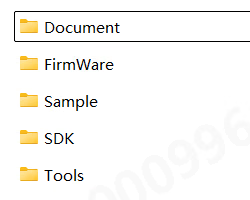
- Document contains various documentation for the SDK
- FirmWare contains camera firmware upgrade package
- Sample contains sample code using the Camera SDK in various programming languages
- SDK includes the header files and library files of Camera SDK
Development workflow
Configure the project
C/C++ is recommended for SDK integration. The SDK includes aCMakeLists.txt file for CMake builds, and the Sample folder contains examples in multiple languages. For details, see the examples in Sample and the Linux examples user guide.
Synchronous call flow
Asynchronous call flow
Calling requirements
Parameter types and corresponding APIs
- For enumeration types prefixed with LX_INT, use DcSetIntValue or DcGetIntValue to set or get INT type parameters;
- For enumeration types prefixed with LX_FLOAT, use DcSetFloatValue or DcGetFloatValue to set or get FLOAT type parameters;
- For enumeration types prefixed with LX_BOOL, use DcSetBoolValue or DcGetBoolValue to set or get BOOL type parameters;
- For enumeration types prefixed with LX_STRING, use DcSetStringValue or DcGetStringValue to set or get string type parameters;
- Use DcSetCmd to execute instructions for enumeration types prefixed with LX_CMD;
- For enumeration types prefixed with LX_PTR, use DcGetPtrValue to obtain pointer type results;
API preconditions
1. When the flow is started or the working mode (LX_INT_WORK_MODE) is normally open mode, the following functions are not allowed to be set:- DcSetRoi
- LX_INT_3D_BINNING_MODE;
- LX_INT_2D_BINNING_MODE;
- LX_BOOL_ENABLE_2D_TO_DEPTH;
- LX_BOOL_ENABLE_MULTI_EXPOSURE_HDR;
- LX_BOOL_ENABLE_MULTI_MACHINE;
- LX_INT_TRIGGER_MODE;
- LX_INT_CALCULATE_UP;
- LX_BOOL_ENABLE_HDR;
- LX_BOOL_ENABLE_TOF_DEPTH_CALIBE;
- LX_BOOL_ENABLE_SYNC_FRAME
- LX_INT_SAVE_PARAMS_GROUP
- LX_INT_TOF_FREQMODE
- LX_BOOL_ENABLE_MULTI_EXPOSURE_HDR ;
- LX_INT_FIRST_EXPOSURE;
- LX_INT_SECOND_EXPOSURE;
- LX_INT_THIRD_EXPOSURE;
- LX_INT_GAIN;
- LX_INT_3D_AUTO_EXPOSURE_LEVEL
- (LX_INT_3D_AUTO_EXPOSURE_MIN)
- LX_INT_2D_MANUAL_EXPOSURE
6. When 2D automatic exposure (LX_BOOL_ENABLE_2D_AUTO_EXPOSURE) is turned off, the following function enumeration is not allowed to operate:
- LX_INT_2D_AUTO_EXPOSURE_LEVEL;
7.In extraordinary filtering mode, the following settings are not allowed:
- LX_INT_FILTER_SMOOTH_LEVEL LX_INT_FILTER_NOISE_LEVEL
- LX_INT_FILTER_TIME_LEVEL
8.When turning on 2D anti-distortion, RGB-D alignment must be turned on first:
- LX_BOOL_ENABLE_2D_TO_DEPTH
9.For non-S2 type devices, when turning on the built-in algorithm, you need to set the tof algorithm first. The algorithm parameters are only allowed to be set when the built-in algorithm (LX_INT_ALGORITHM_MODE) is turned on.
- (LX_STRING_ALGORITHM_PARAMS)
10.To obtain point cloud data (LX_PTR_XYZ_DATA), you must first open the depth map
- (LX_BOOL_ENABLE_3D_DEPTH_STREAM)
Data types
5.1 LX_STATE
Function: SDK interface function return value status code5.2 LX_DATA_TYPE
Function: data format. 3D intensity map and depth map have different data formats. To obtain the data pointer, you need to use the corresponding feature.5.3 LX_BINNING_MODE
Function: Bining mode5.4 LX_STRUCT_LIGHT_CODE_MODE
Function:5.5 LX_ALGORITHM_MODE
Function:5.6 LX_CAMERA_WORK_MODE
Function:5.7 LX_TRIGGER_MODE
Function:5.8 LX_CAMERA_FEATURE
Function: Various readable and writable parameters5.8.1 int type parameters
5.8.1.1 General parameters
5.8.1.2 3D image parameters
5.8.1.4 2D image parameters
5.8.1.5 Trigger parameters
5.8.1.6 Filter parameters
5.8.2 float type parameters
5.8.3 bool type parameter
5.8.4 string type parameters
5.8.5 Command type parameters
5.8.6 ptr type parameters
5.9 LxDeviceInfo
Function: Device attribute information structure5.10 LxIntValueInfo
Function: Device attribute information structure5.11 LxFloatValueInfo
Function: Device attribute information structure5.12 LX_DEVICE_TYPE
Function: device type5.13 LX_OPEN_MODE
Function: device type5.14 FrameDataInfo
Function: Image display information structure5.15 FrameInfo
Function: Data frame information structureAPI reference
API prototypes are defined by the SDK headers and the shipped SDK version. Unless noted otherwise,
LX_SUCCESS indicates a successful call.6.1 Find, connect and close the camera
6.1.1 DcGetDeviceList
Function prototype: Function function: Get a list of supported cameras. Function parameters:- [out]devlist Found camera list
- [out]devnum Number of cameras found
6.1.2 DcOpenDevice
Function prototype:
- [in]open_mode open mode, see OpenMode for details
- [in]param different opening methods, fill in different parameters
- [out]handle is the device handle returned after successful connection. All subsequent interface access depends on this handle.
- [out]info Camera details returned after successful connection
6.1.3 DcCloseDevice
Function prototype:
- [in]handle device handle
6.2 Start streaming and close streaming
6.2.1 DcStartStream
Function prototype:
- [in]handle device handle
6.2.2 DcStopStream
Function prototype:
- [in]handle device handle
6.3 Reading and setting camera parameters
6.3.1 DcSetIntValue
Function prototype:
- [in]handle device handle
- [in]cmd reference LX_CAMERA_FEATURE
- [in]value sets parameter value
6.3.2 DcGetIntValue
Function prototype:
- [in]handle device handle
- [in]cmd reference LX_CAMERA_FEATURE
- [out]value returns the parameter structure, the maximum and minimum values of the parameters, the current value, etc.
6.3.3 DcSetFloatValue
Function prototype:
- [in]handle device handle
- [in]cmd reference LX_CAMERA_FEATURE
- [in]value sets parameter value
6.3.4 DcGetFloatValue
Function prototype:
- [in]handle device handle
- [in]cmd reference LX_CAMERA_FEATURE
- [out]value returns the parameter structure, the maximum and minimum values of the parameters, the current value, etc.
6.3.5 DcSetBoolValue
Function prototype:
- [in]handle device handle
- [in]cmd reference LX_CAMERA_FEATURE
- [in]value sets parameter value
6.3.6 DcGetBoolValue
Function prototype:
- [in]handle device handle
- [in]cmd reference LX_CAMERA_FEATURE
- [out]value return parameters
6.3.7 DcSetStringValue
Function prototype:
- [in]handle device handle
- [in]cmd refer to LX_CAMERA_FEATURE
- [in]value sets parameter value
6.3.8 DcGetStringValue
Function prototype:
- [in]handle device handle
- [in]cmd reference LX_CAMERA_FEATURE
- [out]value returns parameters without external allocation of memory
6.3.9 DcGetPtrValue
Function prototype:
- [in]handle device handle
- [in]cmd reference LX_CAMERA_FEATURE
- [out]value returns parameters without external allocation of memory
6.3.10 DcSetCmd
Function prototype:
- [in]handle device handle
- [in]cmd reference LX_CAMERA_FEATURE
6.4 Save point cloud
6.4.1 DcSaveXYZ
Function prototype:
- handle device handle
- filename file name, supports txt, ply and pcd formats. txt format saves all data in image order, ply and pcd only save non-zero data
6.5 Special Controls
6.5.1 DcSpecialControl
Function prototype:
- [in]handle device handle
- [in]param operation
- [inout]value is the corresponding input parameter when set, and the corresponding outgoing parameter when obtained, without external allocation of memory.
6.6 Set ROI and parameter path
6.6.1 DcSetRoI
Function prototype:
- [in]handle device handle
- [in]offsetx horizontal offset of starting point in pixels
- [in]offsety vertical offset of starting point in pixels
- [in]widthroi width of the target area
- [in]heightroi height of the target area
- [in]type0-3D image 1-2D image
6.7 Set camera IP
6.7.1 DcSetCameraIp
Function prototype: Function function: Set camera IP and subnet mask, gateway Function parameters:- [in]handle device handle,
- [in]ip device IP,
- [in]netmask subnet mask (if empty, the internal default is “255.255.0.0”)
- [in]gateway gateway ip (if empty, the internal default is to set the last network segment of ip to “1” as the gateway)
6.8 Log information and version information
6.8.1 DcGetApiVersion
Function prototype:
6.8.2 DcSetInfoOutput
Function prototype: Function function: Set printing information level Function parameters:- [in]print_level 0: info all debugging information; 1: warn important and warning debugging information; 2: error only output error information
- [in]enable_screen_print whether to print in the window
- [in]log_path The log file saving path (does not include the log file name), can be empty. Windows defaults to the current user path, and Linux defaults to the /var/log path.
- [in]language language (not used yet)
6.8.3 DcLog
Function prototype:
- [in]str The string to be output, terminated by ‘\0’
6.8.4 DcRegisterFrameCallback
Function prototype: Function function: Register a data frame callback function and automatically call it when new data is received. Function parameters:- [in]handle device handle,
- [in]func frame data callback function,
- [in]usr_data user-defined parameters, can be passed empty
6.8.5 DcUnregisterFrameCallback
Function prototype:
- [in]handle device handle,
6.9 Device status callback
6.9.1 DcRegisterCameraStatusCallback
Function prototype: Function function: Register the camera status callback function, which is automatically called when the camera status changes. Function parameters:- [in]handle device handle,
- [in]func frame data callback function,
- [in]usr_data user-defined parameters, can be passed empty
6.9.2 DcUnregisterCameraStatusCallback
Function prototype:
- [in]handle device handle,