
How it works and what it returns
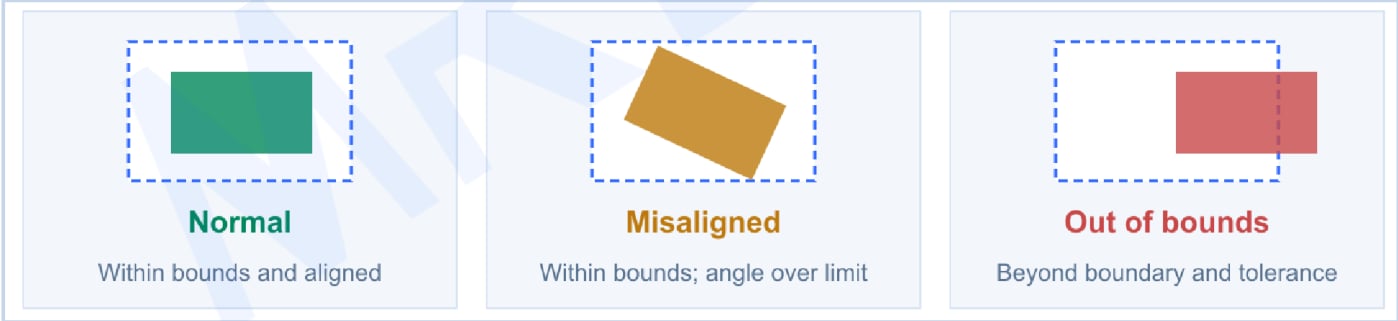
StockSync converts 3D measurements into storage-location states for WMS and scheduling systems. It reports vacant or occupied locations; configured checks can identify normal placement, rotation and boundary violations. Rotation is not evaluated when a boundary violation is detected.
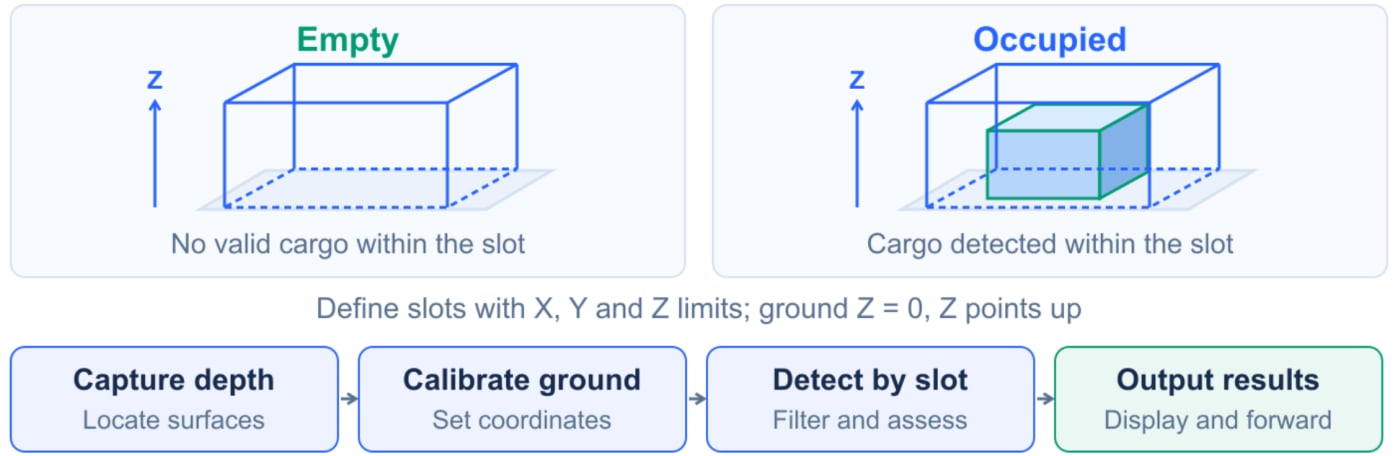
Principle of operation
Operating and installation conditions
The standard configuration uses a fixed S10 Pro. Recommended mounting height for occupancy detection is no more than 8 m. The 5 m target for dimension and placement inspection still requires validation. Test objects with sides of at least 400 mm at the intended height. An absolute dimensional error of no more than 4 cm is an acceptance target, not a universal guarantee. Highly reflective objects are unsuitable; test black objects. Multiple cameras detect independently without automatic view stitching. Install the AW3 frontend only. The StockSync 3.1.1 full update package targets RK3588 / Linux ARM64 and includes the algorithm, camera SDK libraries and device service. Upgrade according to the delivered configuration.Deployment and integration
1
Connect the equipment
Create the camera group in AW3 and inspect RGB images and depth point clouds.
2
Calibrate and configure
Calibrate the ground and create locations; verify their extents, identifiers and detection settings.
3
Validate on site
Test empty, normally occupied, rotated and out-of-bounds cases; confirm dimensions and coverage mean what the business expects.
4
Integrate the results
Configure communication and map location identifiers and states to the WMS or scheduler.

Deployment workflow
Latest downloads
Download user manual
V0.1 · English PDF
Download white paper
V0.1 · English PDF
Download AW3 frontend
AW3 3.1.2 · Windows x64 · Frontend only
Download device firmware package
StockSync 3.1.1 · RK3588 · Linux ARM64
Software downloads
Manual and white paper downloads
Software and document versions are managed separately. Select archived material for the application you have installed.
GitHub