
Обзор
Это руководство предназначено для разработчиков, интегрирующих камеры. В нем описаны API Camera SDK для продуктов M4, M4 Mega, M4 Pro, V1 Pro, S2, S2 Max и H3 Series. SDK работает в системах Windows x86 и Linux x86 или Arm. Camera SDK предоставляет унифицированные API для доступа к устройству и настройки параметров. SDK поддерживает синхронный и асинхронный сбор данных глубины, интенсивности, облака точек и RGB. Некоторые модели камер также предоставляют данные для объезда препятствий, стыковки или локализации.Примеры и описания API основаны на версии SDK, поставляемой с продуктом. Доступные параметры могут различаться в зависимости от продукта, версии прошивки и версии SDK.
Настройка среды
Рекомендуемая конфигурация хоста
Подключение и установка
Подключение оборудования
Камера подключается к внешнему источнику напряжения 24 В и к хост-компьютеру сетевым кабелем, как показано на рисунке 2.1. Рисунок 2.1. Схема подключения камерыНастройка сети
- Сетевой сегмент IP-адресов камеры по умолчанию: 192.168.100.*
- На хост-компьютере задайте для сетевого порта, подключенного к камере, адрес из сегмента 192.168.100.x и убедитесь, что он не конфликтует с устройством. Маска подсети — 255.255.255.0, как показано на рисунке ниже:
- При подключении к камере рекомендуется отключить брандмауэр, чтобы хост с SDK не перехватывал пакеты данных камеры, как показано на следующем рисунке:
- Настройка сети в Linux аналогична настройке в Windows. Команды управления брандмауэром зависят от дистрибутива. В Ubuntu выполните:
Установка SDK
Windows
Откройте установочный пакет и установите Lanxin-MRDVS-xxx.exe. Для установки для всех пользователей запустите установочный пакет с правами администратора. На рисунках ниже показан процесс установки.Linux
- Распакуйте пакет и запустите скрипт установки:
/opt/Lanxin-MRDVS и задает переменные среды для текущего пользователя. Если программа запускается от имени другого пользователя, повторно выполните скрипт для этого пользователя или добавьте следующую строку в его ~/.bashrc:
Использование Camera SDK
Структура каталогов
В каталоге Camera SDK находятся следующие материалы: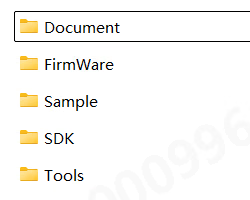
- Document содержит различную документацию по SDK
- FirmWare содержит пакет обновления прошивки камеры
- Sample содержит примеры использования Camera SDK на разных языках программирования
- SDK содержит заголовочные и библиотечные файлы Camera SDK
Рабочий процесс разработки
Настройка проекта
Для интеграции SDK рекомендуется использовать C/C++. SDK включает файлCMakeLists.txt для сборки с помощью CMake, а каталог Sample содержит примеры на нескольких языках. Подробнее см. в примерах из каталога Sample и руководстве по примерам для Linux.
Синхронный процесс вызова
Асинхронный процесс вызова
Требования к вызовам
Типы параметров и соответствующие API
- Для перечислений с префиксом LX_INT используйте DcSetIntValue или DcGetIntValue для задания или получения параметров типа INT.
- Для перечислений с префиксом LX_FLOAT используйте DcSetFloatValue или DcGetFloatValue для задания или получения параметров типа FLOAT.
- Для перечислений с префиксом LX_BOOL используйте DcSetBoolValue или DcGetBoolValue для задания или получения параметров типа BOOL.
- Для перечислений с префиксом LX_STRING используйте DcSetStringValue или DcGetStringValue для задания или получения строковых параметров.
- Для выполнения команд перечислений с префиксом LX_CMD используйте DcSetCmd.
- Для перечислений с префиксом LX_PTR используйте DcGetPtrValue для получения результатов типа указателя.
Предварительные условия API
1. Когда поток запущен или для рабочего режима (LX_INT_WORK_MODE) установлен постоянно включенный режим, нельзя задавать следующие функции:- DcSetRoi
- LX_INT_3D_BINNING_MODE;
- LX_INT_2D_BINNING_MODE;
- LX_BOOL_ENABLE_2D_TO_DEPTH;
- LX_BOOL_ENABLE_MULTI_EXPOSURE_HDR;
- LX_BOOL_ENABLE_MULTI_MACHINE;
- LX_INT_TRIGGER_MODE;
- LX_INT_CALCULATE_UP;
- LX_BOOL_ENABLE_HDR;
- LX_BOOL_ENABLE_TOF_DEPTH_CALIBE;
- LX_BOOL_ENABLE_SYNC_FRAME
- LX_INT_SAVE_PARAMS_GROUP
- LX_INT_TOF_FREQMODE
- LX_BOOL_ENABLE_MULTI_EXPOSURE_HDR ;
- LX_INT_FIRST_EXPOSURE;
- LX_INT_SECOND_EXPOSURE;
- LX_INT_THIRD_EXPOSURE;
- LX_INT_GAIN;
- LX_INT_3D_AUTO_EXPOSURE_LEVEL
- (LX_INT_3D_AUTO_EXPOSURE_MIN)
- LX_INT_2D_MANUAL_EXPOSURE
6. Когда автоматическая экспозиция 2D (LX_BOOL_ENABLE_2D_AUTO_EXPOSURE) выключена, нельзя выполнять следующие операции с перечислением функции:
- LX_INT_2D_AUTO_EXPOSURE_LEVEL;
7.В специальном режиме фильтрации нельзя задавать следующие параметры:
- LX_INT_FILTER_SMOOTH_LEVEL LX_INT_FILTER_NOISE_LEVEL
- LX_INT_FILTER_TIME_LEVEL
8.Перед включением устранения искажений 2D сначала включите выравнивание RGB-D:
- LX_BOOL_ENABLE_2D_TO_DEPTH
9.Для устройств, не относящихся к S2, перед включением встроенного алгоритма сначала задайте алгоритм ToF. Параметры алгоритма можно задавать только при включенном встроенном алгоритме (LX_INT_ALGORITHM_MODE).
- (LX_STRING_ALGORITHM_PARAMS)
10.Для получения данных облака точек (LX_PTR_XYZ_DATA) сначала включите карту глубины.
- (LX_BOOL_ENABLE_3D_DEPTH_STREAM)
Типы данных
5.1 LX_STATE
Назначение: код состояния, возвращаемый функцией интерфейса SDK5.2 LX_DATA_TYPE
Назначение: формат данных. Карты интенсивности 3D и глубины имеют разные форматы данных. Для получения указателя на данные используйте соответствующий параметр.5.3 LX_BINNING_MODE
Назначение: режим объединения пикселей5.4 LX_STRUCT_LIGHT_CODE_MODE
Назначение:5.5 LX_ALGORITHM_MODE
Назначение:5.6 LX_CAMERA_WORK_MODE
Назначение:5.7 LX_TRIGGER_MODE
Назначение:5.8 LX_CAMERA_FEATURE
Назначение: различные доступные для чтения и записи параметры5.8.1 Параметры типа int
5.8.1.1 Общие параметры
5.8.1.2 Параметры изображения 3D
5.8.1.4 Параметры изображения 2D
5.8.1.5 Trigger parameters
5.8.1.6 Filter parameters
5.8.2 float type parameters
5.8.3 bool type parameter
5.8.4 string type parameters
5.8.5 Command type parameters
5.8.6 ptr type parameters
5.9 LxDeviceInfo
Function: Device attribute information structure5.10 LxIntValueInfo
Function: Device attribute information structure5.11 LxFloatValueInfo
Function: Device attribute information structure5.12 LX_DEVICE_TYPE
Function: device type5.13 LX_OPEN_MODE
Function: device type5.14 FrameDataInfo
Function: Image display information structure5.15 FrameInfo
Function: Data frame information structureAPI reference
API prototypes are defined by the SDK headers and the shipped SDK version. Unless noted otherwise,
LX_SUCCESS indicates a successful call.6.1 Find, connect and close the camera
6.1.1 DcGetDeviceList
Function prototype: Function function: Get a list of supported cameras. Function parameters:- [out]devlist Found camera list
- [out]devnum Number of cameras found
6.1.2 DcOpenDevice
Function prototype:
- [in]open_mode open mode, see OpenMode for details
- [in]param different opening methods, fill in different parameters
- [out]handle is the device handle returned after successful connection. All subsequent interface access depends on this handle.
- [out]info Camera details returned after successful connection
6.1.3 DcCloseDevice
Function prototype:
- [in]handle device handle
6.2 Start streaming and close streaming
6.2.1 DcStartStream
Function prototype:
- [in]handle device handle
6.2.2 DcStopStream
Function prototype:
- [in]handle device handle
6.3 Reading and setting camera parameters
6.3.1 DcSetIntValue
Function prototype:
- [in]handle device handle
- [in]cmd reference LX_CAMERA_FEATURE
- [in]value sets parameter value
6.3.2 DcGetIntValue
Function prototype:
- [in]handle device handle
- [in]cmd reference LX_CAMERA_FEATURE
- [out]value returns the parameter structure, the maximum and minimum values of the parameters, the current value, etc.
6.3.3 DcSetFloatValue
Function prototype:
- [in]handle device handle
- [in]cmd reference LX_CAMERA_FEATURE
- [in]value sets parameter value
6.3.4 DcGetFloatValue
Function prototype:
- [in]handle device handle
- [in]cmd reference LX_CAMERA_FEATURE
- [out]value returns the parameter structure, the maximum and minimum values of the parameters, the current value, etc.
6.3.5 DcSetBoolValue
Function prototype:
- [in]handle device handle
- [in]cmd reference LX_CAMERA_FEATURE
- [in]value sets parameter value
6.3.6 DcGetBoolValue
Function prototype:
- [in]handle device handle
- [in]cmd reference LX_CAMERA_FEATURE
- [out]value return parameters
6.3.7 DcSetStringValue
Function prototype:
- [in]handle device handle
- [in]cmd refer to LX_CAMERA_FEATURE
- [in]value sets parameter value
6.3.8 DcGetStringValue
Function prototype:
- [in]handle device handle
- [in]cmd reference LX_CAMERA_FEATURE
- [out]value returns parameters without external allocation of memory
6.3.9 DcGetPtrValue
Function prototype:
- [in]handle device handle
- [in]cmd reference LX_CAMERA_FEATURE
- [out]value returns parameters without external allocation of memory
6.3.10 DcSetCmd
Function prototype:
- [in]handle device handle
- [in]cmd reference LX_CAMERA_FEATURE
6.4 Save point cloud
6.4.1 DcSaveXYZ
Function prototype:
- handle device handle
- filename file name, supports txt, ply and pcd formats. txt format saves all data in image order, ply and pcd only save non-zero data
6.5 Special Controls
6.5.1 DcSpecialControl
Function prototype:
- [in]handle device handle
- [in]param operation
- [inout]value is the corresponding input parameter when set, and the corresponding outgoing parameter when obtained, without external allocation of memory.
6.6 Set ROI and parameter path
6.6.1 DcSetRoI
Function prototype:
- [in]handle device handle
- [in]offsetx horizontal offset of starting point in pixels
- [in]offsety vertical offset of starting point in pixels
- [in]widthroi width of the target area
- [in]heightroi height of the target area
- [in]type0-3D image 1-2D image
6.7 Set camera IP
6.7.1 DcSetCameraIp
Function prototype: Function function: Set camera IP and subnet mask, gateway Function parameters:- [in]handle device handle,
- [in]ip device IP,
- [in]netmask subnet mask (if empty, the internal default is “255.255.0.0”)
- [in]gateway gateway ip (if empty, the internal default is to set the last network segment of ip to “1” as the gateway)
6.8 Log information and version information
6.8.1 DcGetApiVersion
Function prototype:
6.8.2 DcSetInfoOutput
Function prototype: Function function: Set printing information level Function parameters:- [in]print_level 0: info all debugging information; 1: warn important and warning debugging information; 2: error only output error information
- [in]enable_screen_print whether to print in the window
- [in]log_path The log file saving path (does not include the log file name), can be empty. Windows defaults to the current user path, and Linux defaults to the /var/log path.
- [in]language language (not used yet)
6.8.3 DcLog
Function prototype:
- [in]str The string to be output, terminated by ‘\0’
6.8.4 DcRegisterFrameCallback
Function prototype: Function function: Register a data frame callback function and automatically call it when new data is received. Function parameters:- [in]handle device handle,
- [in]func frame data callback function,
- [in]usr_data user-defined parameters, can be passed empty
6.8.5 DcUnregisterFrameCallback
Function prototype:
- [in]handle device handle,
6.9 Device status callback
6.9.1 DcRegisterCameraStatusCallback
Function prototype: Function function: Register the camera status callback function, which is automatically called when the camera status changes. Function parameters:- [in]handle device handle,
- [in]func frame data callback function,
- [in]usr_data user-defined parameters, can be passed empty
6.9.2 DcUnregisterCameraStatusCallback
Function prototype:
- [in]handle device handle,