
Tổng quan
Hướng dẫn này dành cho nhà phát triển tích hợp thiết bị camera. Tài liệu bao quát các API Camera SDK cho các sản phẩm M4, M4 Mega, M4 Pro, V1 Pro, S2, S2 Max và dòng H3. SDK chạy trên x86 Windows và hệ thống x86 hoặc Arm Linux. Camera SDK cung cấp các API thống nhất để truy cập thiết bị và cấu hình tham số. SDK hỗ trợ thu nhận đồng bộ và bất đồng bộ dữ liệu độ sâu, cường độ, đám mây điểm và RGB. Một số model camera còn cung cấp dữ liệu tránh chướng ngại vật, docking hoặc định vị.Ví dụ và mô tả API dựa trên phiên bản SDK được cung cấp cùng sản phẩm. Các tham số khả dụng có thể thay đổi theo sản phẩm, firmware và phiên bản SDK.
Thiết lập môi trường
Cấu hình máy chủ khuyến nghị
Kết nối và cài đặt
Kết nối phần cứng
Camera được nối với nguồn điện 24V bên ngoài và kết nối với máy tính chủ bằng cáp mạng như minh họa trong Hình 2.1. Hình 2.1 Sơ đồ kết nối cameraCấu hình mạng
- Phân đoạn mạng IP mặc định của camera là: 192.168.100.*
- Trên máy tính chủ, đặt địa chỉ IP của cổng mạng kết nối với camera thành địa chỉ thuộc phân đoạn mạng 192.168.100.x và đảm bảo không xung đột với thiết bị. Mặt nạ mạng con là 255.255.255.0 như minh họa bên dưới:
- Khi kết nối với camera, nên tắt tường lửa để tránh các gói dữ liệu của camera bị máy chủ chạy SDK chặn, như minh họa trong hình sau:
- Cấu hình mạng trên Linux giống với Windows. Lệnh tường lửa thay đổi tùy bản phân phối. Trên Ubuntu, chạy:
Install the SDK
Windows
Mở gói cài đặt và cài đặt Lanxin-MRDVS-xxx.exe. Nếu cần cài đặt cho tất cả người dùng, bạn phải có quyền quản trị để chạy gói cài đặt. Hình bên dưới minh họa quy trình cài đặt.Linux
- Giải nén gói và chạy script cài đặt:
/opt/Lanxin-MRDVS và thiết lập biến môi trường cho người dùng hiện tại. Nếu chương trình chạy dưới người dùng khác, hãy chạy lại script cho người dùng đó hoặc thêm dòng sau vào ~/.bashrc của người dùng đó:
Sử dụng Camera SDK
Cấu trúc thư mục
Thư mục Camera SDK có các thành phần sau: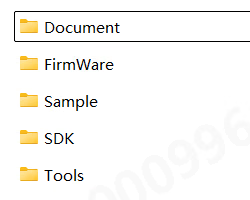
- Document chứa nhiều tài liệu khác nhau về SDK
- FirmWare chứa gói nâng cấp firmware camera
- Sample chứa mã mẫu sử dụng Camera SDK bằng nhiều ngôn ngữ lập trình
- SDK chứa các tệp header và tệp thư viện của Camera SDK
Quy trình phát triển
Cấu hình dự án
Khuyến nghị sử dụng C/C++ để tích hợp SDK. SDK có tệpCMakeLists.txt phục vụ quá trình build bằng CMake, còn thư mục Sample chứa ví dụ bằng nhiều ngôn ngữ. Để biết chi tiết, xem các ví dụ trong Sample và hướng dẫn ví dụ Linux.
Luồng gọi đồng bộ
Luồng gọi bất đồng bộ
Yêu cầu khi gọi
Loại tham số và API tương ứng
- Với các kiểu enum có tiền tố LX_INT, sử dụng DcSetIntValue hoặc DcGetIntValue để đặt hoặc lấy tham số kiểu INT;
- Với các kiểu enum có tiền tố LX_FLOAT, sử dụng DcSetFloatValue hoặc DcGetFloatValue để đặt hoặc lấy tham số kiểu FLOAT;
- Với các kiểu enum có tiền tố LX_BOOL, sử dụng DcSetBoolValue hoặc DcGetBoolValue để đặt hoặc lấy tham số kiểu BOOL;
- Với các kiểu enum có tiền tố LX_STRING, sử dụng DcSetStringValue hoặc DcGetStringValue để đặt hoặc lấy tham số kiểu string;
- Sử dụng DcSetCmd để thực thi lệnh cho các kiểu enum có tiền tố LX_CMD;
- Với các kiểu enum có tiền tố LX_PTR, sử dụng DcGetPtrValue để lấy kết quả kiểu con trỏ;
Điều kiện trước khi gọi API
1. Khi luồng đã khởi động hoặc chế độ làm việc (LX_INT_WORK_MODE) là chế độ thường mở, không được đặt các chức năng sau:- DcSetRoi
- LX_INT_3D_BINNING_MODE;
- LX_INT_2D_BINNING_MODE;
- LX_BOOL_ENABLE_2D_TO_DEPTH;
- LX_BOOL_ENABLE_MULTI_EXPOSURE_HDR;
- LX_BOOL_ENABLE_MULTI_MACHINE;
- LX_INT_TRIGGER_MODE;
- LX_INT_CALCULATE_UP;
- LX_BOOL_ENABLE_HDR;
- LX_BOOL_ENABLE_TOF_DEPTH_CALIBE;
- LX_BOOL_ENABLE_SYNC_FRAME
- LX_INT_SAVE_PARAMS_GROUP
- LX_INT_TOF_FREQMODE
- LX_BOOL_ENABLE_MULTI_EXPOSURE_HDR ;
- LX_INT_FIRST_EXPOSURE;
- LX_INT_SECOND_EXPOSURE;
- LX_INT_THIRD_EXPOSURE;
- LX_INT_GAIN;
- LX_INT_3D_AUTO_EXPOSURE_LEVEL
- (LX_INT_3D_AUTO_EXPOSURE_MIN)
- LX_INT_2D_MANUAL_EXPOSURE
6. Khi tắt phơi sáng tự động 2D (LX_BOOL_ENABLE_2D_AUTO_EXPOSURE), không được thao tác enum chức năng sau:
- LX_INT_2D_AUTO_EXPOSURE_LEVEL;
7.Trong chế độ lọc đặc biệt, không được đặt các tham số sau:
- LX_INT_FILTER_SMOOTH_LEVEL LX_INT_FILTER_NOISE_LEVEL
- LX_INT_FILTER_TIME_LEVEL
8.Khi bật khử méo 2D, trước tiên phải bật căn chỉnh RGB-D:
- LX_BOOL_ENABLE_2D_TO_DEPTH
9.Với thiết bị không thuộc loại S2, khi bật thuật toán tích hợp, trước tiên phải đặt thuật toán tof. Chỉ được đặt tham số thuật toán khi thuật toán tích hợp (LX_INT_ALGORITHM_MODE) đã bật.
- (LX_STRING_ALGORITHM_PARAMS)
10.Để lấy dữ liệu đám mây điểm (LX_PTR_XYZ_DATA), trước tiên phải bật bản đồ độ sâu
- (LX_BOOL_ENABLE_3D_DEPTH_STREAM)
Kiểu dữ liệu
5.1 LX_STATE
Chức năng: mã trạng thái giá trị trả về của hàm giao diện SDK5.2 LX_DATA_TYPE
Chức năng: định dạng dữ liệu. Bản đồ cường độ 3D và bản đồ độ sâu có định dạng dữ liệu khác nhau. Để lấy con trỏ dữ liệu, cần sử dụng feature tương ứng.5.3 LX_BINNING_MODE
Chức năng: chế độ Binning5.4 LX_STRUCT_LIGHT_CODE_MODE
Chức năng:5.5 LX_ALGORITHM_MODE
Chức năng:5.6 LX_CAMERA_WORK_MODE
Chức năng:5.7 LX_TRIGGER_MODE
Chức năng:5.8 LX_CAMERA_FEATURE
Chức năng: các tham số có thể đọc và ghi5.8.1 int type parameters
5.8.1.1 Tham số chung
5.8.1.2 Tham số ảnh 3D
5.8.1.4 Tham số ảnh 2D
5.8.1.5 Tham số trigger
5.8.1.6 Tham số bộ lọc
5.8.2 float type parameters
5.8.3 bool type parameter
5.8.4 string type parameters
5.8.5 Command type parameters
5.8.6 ptr type parameters
5.9 LxDeviceInfo
Function: Device attribute information structure5.10 LxIntValueInfo
Function: Device attribute information structure5.11 LxFloatValueInfo
Function: Device attribute information structure5.12 LX_DEVICE_TYPE
Function: device type5.13 LX_OPEN_MODE
Function: device type5.14 FrameDataInfo
Function: Image display information structure5.15 FrameInfo
Function: Data frame information structureAPI reference
API prototypes are defined by the SDK headers and the shipped SDK version. Unless noted otherwise,
LX_SUCCESS indicates a successful call.6.1 Find, connect and close the camera
6.1.1 DcGetDeviceList
Function prototype: Function function: Get a list of supported cameras. Function parameters:- [out]devlist Found camera list
- [out]devnum Number of cameras found
6.1.2 DcOpenDevice
Function prototype:
- [in]open_mode open mode, see OpenMode for details
- [in]param different opening methods, fill in different parameters
- [out]handle is the device handle returned after successful connection. All subsequent interface access depends on this handle.
- [out]info Camera details returned after successful connection
6.1.3 DcCloseDevice
Function prototype:
- [in]handle device handle
6.2 Start streaming and close streaming
6.2.1 DcStartStream
Function prototype:
- [in]handle device handle
6.2.2 DcStopStream
Function prototype:
- [in]handle device handle
6.3 Reading and setting camera parameters
6.3.1 DcSetIntValue
Function prototype:
- [in]handle device handle
- [in]cmd reference LX_CAMERA_FEATURE
- [in]value sets parameter value
6.3.2 DcGetIntValue
Function prototype:
- [in]handle device handle
- [in]cmd reference LX_CAMERA_FEATURE
- [out]value returns the parameter structure, the maximum and minimum values of the parameters, the current value, etc.
6.3.3 DcSetFloatValue
Function prototype:
- [in]handle device handle
- [in]cmd reference LX_CAMERA_FEATURE
- [in]value sets parameter value
6.3.4 DcGetFloatValue
Function prototype:
- [in]handle device handle
- [in]cmd reference LX_CAMERA_FEATURE
- [out]value returns the parameter structure, the maximum and minimum values of the parameters, the current value, etc.
6.3.5 DcSetBoolValue
Function prototype:
- [in]handle device handle
- [in]cmd reference LX_CAMERA_FEATURE
- [in]value sets parameter value
6.3.6 DcGetBoolValue
Function prototype:
- [in]handle device handle
- [in]cmd reference LX_CAMERA_FEATURE
- [out]value return parameters
6.3.7 DcSetStringValue
Function prototype:
- [in]handle device handle
- [in]cmd refer to LX_CAMERA_FEATURE
- [in]value sets parameter value
6.3.8 DcGetStringValue
Function prototype:
- [in]handle device handle
- [in]cmd reference LX_CAMERA_FEATURE
- [out]value returns parameters without external allocation of memory
6.3.9 DcGetPtrValue
Function prototype:
- [in]handle device handle
- [in]cmd reference LX_CAMERA_FEATURE
- [out]value returns parameters without external allocation of memory
6.3.10 DcSetCmd
Function prototype:
- [in]handle device handle
- [in]cmd reference LX_CAMERA_FEATURE
6.4 Save point cloud
6.4.1 DcSaveXYZ
Function prototype:
- handle device handle
- filename file name, supports txt, ply and pcd formats. txt format saves all data in image order, ply and pcd only save non-zero data
6.5 Special Controls
6.5.1 DcSpecialControl
Function prototype:
- [in]handle device handle
- [in]param operation
- [inout]value is the corresponding input parameter when set, and the corresponding outgoing parameter when obtained, without external allocation of memory.
6.6 Set ROI and parameter path
6.6.1 DcSetRoI
Function prototype:
- [in]handle device handle
- [in]offsetx horizontal offset of starting point in pixels
- [in]offsety vertical offset of starting point in pixels
- [in]widthroi width of the target area
- [in]heightroi height of the target area
- [in]type0-3D image 1-2D image
6.7 Set camera IP
6.7.1 DcSetCameraIp
Function prototype: Function function: Set camera IP and subnet mask, gateway Function parameters:- [in]handle device handle,
- [in]ip device IP,
- [in]netmask subnet mask (if empty, the internal default is “255.255.0.0”)
- [in]gateway gateway ip (if empty, the internal default is to set the last network segment of ip to “1” as the gateway)
6.8 Log information and version information
6.8.1 DcGetApiVersion
Function prototype:
6.8.2 DcSetInfoOutput
Function prototype: Function function: Set printing information level Function parameters:- [in]print_level 0: info all debugging information; 1: warn important and warning debugging information; 2: error only output error information
- [in]enable_screen_print whether to print in the window
- [in]log_path The log file saving path (does not include the log file name), can be empty. Windows defaults to the current user path, and Linux defaults to the /var/log path.
- [in]language language (not used yet)
6.8.3 DcLog
Function prototype:
- [in]str The string to be output, terminated by ‘\0’
6.8.4 DcRegisterFrameCallback
Function prototype: Function function: Register a data frame callback function and automatically call it when new data is received. Function parameters:- [in]handle device handle,
- [in]func frame data callback function,
- [in]usr_data user-defined parameters, can be passed empty
6.8.5 DcUnregisterFrameCallback
Function prototype:
- [in]handle device handle,
6.9 Device status callback
6.9.1 DcRegisterCameraStatusCallback
Function prototype: Function function: Register the camera status callback function, which is automatically called when the camera status changes. Function parameters:- [in]handle device handle,
- [in]func frame data callback function,
- [in]usr_data user-defined parameters, can be passed empty
6.9.2 DcUnregisterCameraStatusCallback
Function prototype:
- [in]handle device handle,